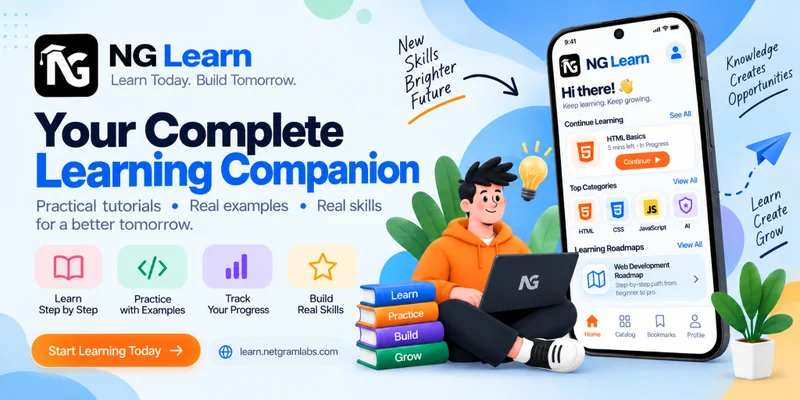
NG Learn is an Android learning application by NetGram Labs and the mobile version of the NetGram Learn website. Built with React Native, React 19, Expo SDK 57, TypeScript, and Expo Router, it features a custom Claymorphism UI, smooth animations, and a mobile-friendly learning experience to help users explore programming, web development, AI, and other technology subjects.
NG Learn is an Android-based technology learning application developed by NetGram Labs to make programming, web development, artificial intelligence, and other technical subjects easier to learn on mobile devices.
The application is the mobile counterpart of the NetGram Learn website. Both are part of the same learning ecosystem, with NG Learn bringing the learning experience to Android through a dedicated mobile interface.
Built with React Native, React 19, Expo SDK 57, Expo Router, and TypeScript, the application combines a modern mobile architecture with a custom Claymorphism-inspired user interface. React Native Reanimated supports smooth animations and interactive UI elements, while Context API is used for application-level state management.
The goal is to make technical learning more accessible, structured, and convenient, allowing learners to explore educational content and build their knowledge wherever they are.
Image-1
Image-2
Image-3
About NG Learn
NG Learn is an education-focused technology learning platform designed for students, beginners, developers, and anyone interested in developing practical digital skills.
The platform covers a range of technology subjects, including web development, programming, artificial intelligence, cybersecurity, networking, and databases. Its learning approach focuses on structured tutorials, step-by-step explanations, and practical examples that help learners understand technical concepts.
The Android application extends this experience beyond the browser. Instead of relying only on the website, learners can access the platform through an Android app designed around mobile navigation, touch interactions, and smaller screens.
NG Learn reflects NetGram Labs' focus on building accessible educational products that combine practical learning content with modern application development.
Project Details
Category
Details
Project Name
NG Learn — Android Learning Application
Project Type
Android Education Application
Brand
NetGram Labs
Platform
Android
Related Website
NetGram Learn
Frontend Framework
React Native
React Version
React 19
Development Platform
Expo SDK 57
Navigation
Expo Router
Programming Language
TypeScript
Animation
React Native Reanimated
State Management
Context API
UI Design
Custom Claymorphism UI
Distribution
Google Play Store
Relationship Between NG Learn and NetGram Learn
NG Learn and NetGram Learn are two interfaces for the same learning ecosystem.
The NetGram Learn website provides a browser-based learning experience, while the Android application offers a mobile-first way to access the platform.
Developing a dedicated Android app makes the learning platform more convenient for users who prefer studying on their smartphones. It also allows the interface and interactions to be designed specifically for mobile use instead of simply reproducing a desktop website inside an app.
The two versions share the same overall educational purpose: helping users explore technology topics, follow structured learning material, and develop practical technical knowledge.
The main objectives behind the NG Learn Android application were:
Bring the NetGram Learn learning experience to Android devices.
Make technology education accessible through a dedicated mobile interface.
Organize technical learning content into understandable topics and tutorials.
Provide a modern, visually engaging interface for everyday learning.
Use a maintainable application architecture that supports future development.
Deliver smooth navigation and responsive interactions on mobile screens.
Create a consistent product identity within the NetGram Learn ecosystem.
Main Features
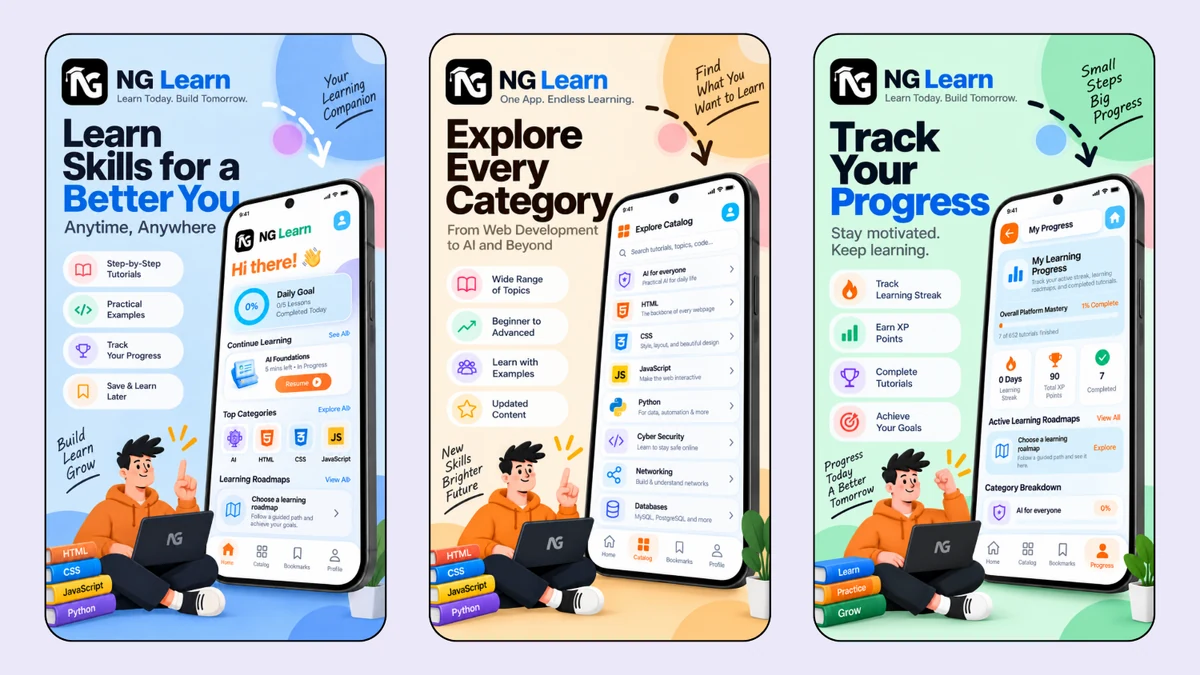
1. Technology Learning Content
NG Learn provides access to educational material covering important areas of technology and software development.
The learning categories listed for the platform include:
Web Development: HTML, CSS, and JavaScript.
Programming: Python and programming fundamentals.
Artificial Intelligence: AI concepts and practical applications.
Cybersecurity: Introduction to digital security and safe computing.
Networking: Fundamental networking concepts.
Databases: Technologies including MySQL and PostgreSQL.
The content is intended to help learners understand technical subjects through organized explanations and practical examples.
2. Step-by-Step Learning Roadmaps
Structured learning roadmaps help users understand what to learn and how to approach a subject in a logical order.
Rather than approaching every topic independently, learners can use guided learning paths to identify the concepts they should study first and the subjects they can explore next.
This approach is especially useful for beginners who need a clearer starting point when learning a new technology.
3. Practical Examples and Code Snippets
Programming becomes easier to understand when concepts are accompanied by practical examples.
NG Learn emphasizes step-by-step tutorials and real-world-oriented code examples to help learners connect theoretical explanations with practical development tasks.
These examples support self-paced learning and help users become more familiar with the structure and use of programming concepts.
4. Learning Progress and Motivation
The platform's listed learning features include progress tracking, daily learning goals, learning streaks, and XP points for completed tutorials.
These elements are intended to help users understand their learning activity and maintain motivation as they move through educational content.
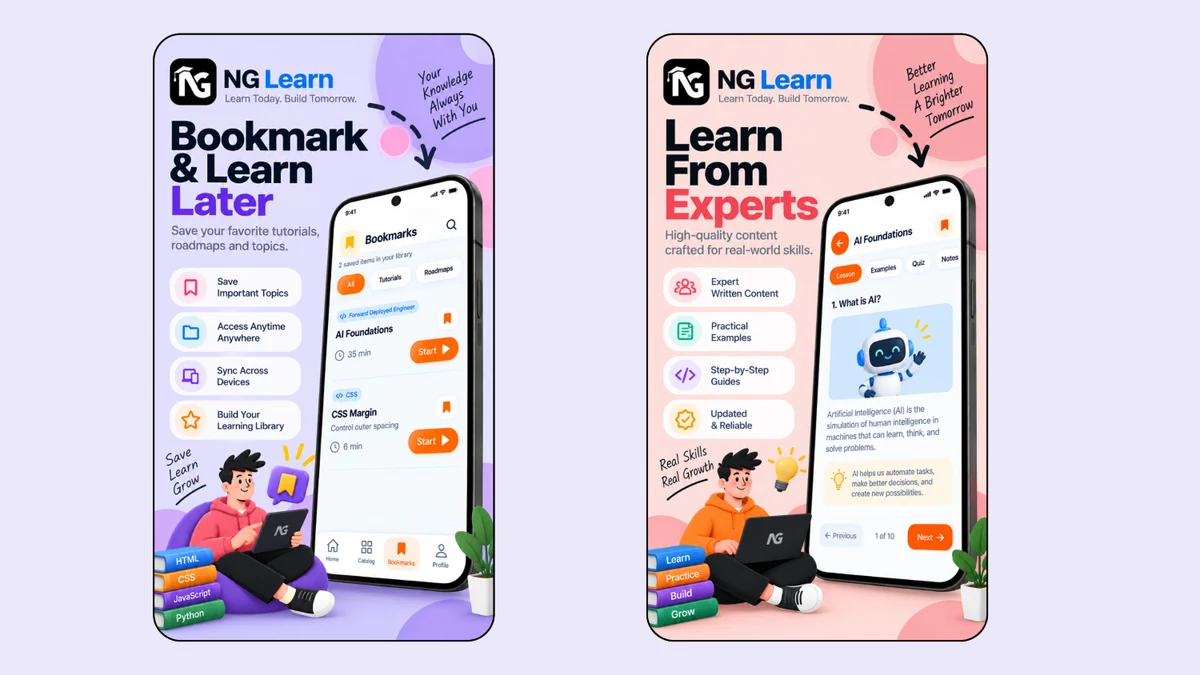
5. Bookmarks and Saved Learning Material
Bookmarking allows users to save important learning material for later reference.
This is useful when learners want to revisit a tutorial, keep track of topics they find helpful, or return to a learning resource without searching for it again.
The Google Play listing also describes bookmark synchronization across devices as a platform capability.
6. Mobile-Focused User Experience
The Android app provides a dedicated interface designed for smartphone use.
Its mobile-first approach prioritizes touch-friendly interactions, clear content presentation, and navigation suited to smaller screens. This gives learners a convenient alternative to accessing the learning platform exclusively through a desktop browser.
UI Design and User Experience
The NG Learn Android application uses a custom Claymorphism-inspired design language.
Claymorphism is characterized by soft surfaces, rounded shapes, dimensional visual elements, and a tactile appearance. Applied carefully, this style can make an interface feel distinctive while maintaining a friendly and approachable visual identity.
The design direction supports the educational purpose of NG Learn by combining a modern appearance with an accessible learning environment.
Design Goals
Visual consistency: Maintain a recognizable interface throughout the app.
Readable content: Present learning material in a clear and structured format.
Mobile usability: Adapt layouts and interactions for Android devices.
Distinctive styling: Use a custom Claymorphism UI rather than relying entirely on default components.
Interactive feedback: Support polished transitions and interface responses.
Maintainability: Keep UI components organized to support future improvements.
The intention is to make the app feel like a dedicated learning product rather than a simple website wrapper.
Application Architecture and Navigation
The application is built with React Native and React 19, using Expo as its development platform.
Expo Router provides the navigation structure, while TypeScript helps define application code with stronger type checking and clearer interfaces.
Context API is used for application-level state management. This provides a way to share relevant state between components without unnecessarily passing the same information through multiple layers of the component tree.
The architecture combines these technologies to support an organized, maintainable mobile application.
Architecture Highlights
Component-based interface development with React Native.
File-based navigation using Expo Router.
TypeScript for clearer code organization and type safety.
Context API for shared application state.
Reusable UI components for consistent interface patterns.
Animation support through React Native Reanimated.
This technology foundation provides a structured starting point for maintaining the app and extending its functionality over time.
Animation and Interaction
React Native Reanimated is part of the application's technology stack and supports the implementation of animated interface interactions.
Animation can improve the perceived quality of a mobile application when used with purpose. Transitions and visual feedback can help users understand interface changes and make navigation feel more natural.
For NG Learn, the animation layer complements the custom Claymorphism design and contributes to the overall mobile experience.
The emphasis is on using motion to support interaction rather than allowing visual effects to distract from the primary task of learning.
Technology Stack
React Native
React Native is the core framework used to develop the Android application. It enables the creation of a mobile interface using React and reusable application components.
React 19
React 19 provides the component-based foundation for building and organizing the application's user interface.
Expo SDK 57
Expo provides the development environment and tooling used for the project. The application is built with Expo SDK 57.
Expo Router
Expo Router handles the application's navigation structure and provides an organized approach to managing app routes.
TypeScript
TypeScript adds static typing to the codebase, helping improve code clarity, maintainability, and the detection of certain errors during development.
React Native Reanimated
React Native Reanimated provides animation capabilities for creating smooth and responsive interface interactions.
Context API
Context API supports shared state across relevant parts of the application and helps reduce unnecessary prop passing between components.
Custom Claymorphism UI
The custom Claymorphism-inspired interface establishes the app's visual identity through soft shapes, rounded components, and dimensional styling.
Development Approach
The application brings together mobile interface design, navigation, state management, and animation within the wider NetGram Learn ecosystem.
The development approach focuses on creating a dedicated Android experience rather than treating mobile access as an afterthought.
Key areas of implementation include:
Mobile application development: Building the Android interface using React Native.
Navigation structure: Organizing application routes with Expo Router.
Typed codebase: Using TypeScript to improve code structure and maintainability.
Shared state: Managing relevant application-level state through Context API.
Interactive UI: Using React Native Reanimated for animation capabilities.
Visual design: Implementing the custom Claymorphism-inspired UI.
Learning ecosystem integration: Positioning the app as the Android counterpart of the NetGram Learn website.
Development Challenges
Adapting a Learning Platform to Mobile
A learning experience that works in a browser must also be comfortable on a smartphone. Mobile layouts have less available space, different interaction patterns, and different navigation expectations.
A dedicated Android interface helps address these differences through mobile-oriented layouts and touch-based interaction.
Maintaining a Consistent Visual Identity
A custom design system requires consistency across different screens and interface components. Reusable components and a defined visual direction help keep the application coherent as it develops.
Organizing Navigation and Application State
As an application grows, navigation and shared state can become difficult to maintain without a clear structure. Expo Router, TypeScript, and Context API provide the core tools used to organize these responsibilities.
Balancing Animation with Usability
Animations should enhance an interface without interrupting the learning process. React Native Reanimated provides the animation layer needed to implement interaction effects while keeping the application's educational purpose central.
NetGram Labs Contribution
NetGram Labs developed NG Learn as the Android application for its technology learning platform.
The project combines mobile application development with a custom user interface and a modern React-based technology stack.
The principal areas represented by the project include:
Android application development using React Native.
React 19-based component architecture.
Expo SDK 57 development environment.
Expo Router navigation implementation.
TypeScript-based application code.
Context API for shared state management.
React Native Reanimated integration.
Custom Claymorphism UI implementation.
Mobile presentation of the NetGram Learn learning ecosystem.
Together, these elements establish NG Learn as the mobile application within the broader NetGram Learn product.
Project Outcome
NG Learn extends the NetGram Learn educational platform to Android devices through a dedicated mobile application.
It combines technology-focused learning content with a custom visual design and a modern application development stack. The result is a mobile learning product intended to make educational resources more convenient to access and easier to explore on smartphones.
By maintaining a clear relationship with the NetGram Learn website, the Android app strengthens the platform's availability across different ways of learning.
The project also demonstrates NetGram Labs' work in mobile application development, interface design, navigation architecture, and the development of education-focused digital products.
Project Highlights
Dedicated Android application for the NetGram Learn platform.
Technology learning across web development, programming, AI, IT, and databases.
Step-by-step educational content and practical examples.
Guided learning roadmaps and progress-oriented features.
Custom Claymorphism-inspired mobile UI.
React Native and React 19-based development.
Expo SDK 57 and Expo Router.
TypeScript for application code organization.
React Native Reanimated for animation support.
Context API for application-level state management.